
Invitation Maker: Cards + RSVP
Photo Studio & Picture Editor LabEvents
4.9837.00 Reviews
- Version
- 177.0
- Installs
- 5.00M
- Age Rating
- Everyone
Screenshots

Our Review of Invitation Maker: Cards + RSVP
 Analysis by Appyee
When an event is close and the invitation still needs to be made, it is easy to lose time juggling design choices, guest details, and replies. Invitation Maker & Event RSVP is an event-planning app from Photo Studio & Picture Editor Lab that brings invitation creation and RSVP coordination together. I see its appeal most clearly when I need something presentable quickly, without opening a full design program or managing every response in a separate spreadsheet.
Where invitation planning can get stuck
The first useful question is not which design looks prettiest, but what guests need to know. A polished card cannot rescue an invite with an unclear date, address, or response request. I would settle those details first, then choose a template that leaves them easy to read. That small order-of-work change can prevent repeated edits and reduces the chance of sending a beautiful invitation with an important detail missing.
The app’s central idea is convenient: create an invitation and give guests a way to respond. Still, RSVP tools work only when people notice and use the response route. For a close group who regularly answers digital invitations, that can reduce the familiar round of individual messages. For guests who prefer a phone call or do not check messages often, I would keep a separate note of their replies rather than assuming every response will arrive through the same channel.
Another place people can lose time is browsing designs before deciding on the event’s tone. A casual family lunch, a formal celebration, and a children’s party call for different visual choices. I find it more efficient to pick a simple direction—such as playful, understated, or formal—then compare a few suitable templates instead of scrolling through everything. If no theme is an exact match, adapting a broader design is often more practical than waiting for a perfect niche option.
Designing Your Perfect Invitation
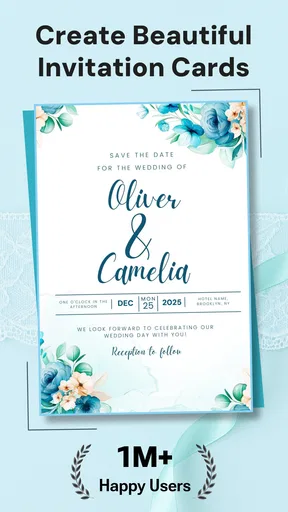
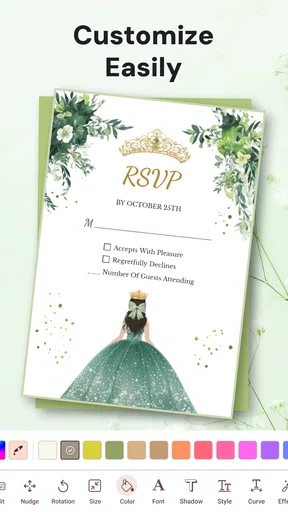
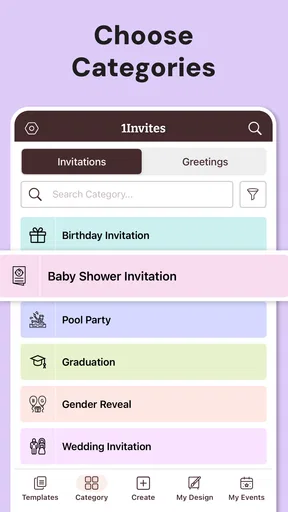
The first thing that caught my eye was the app's user-friendly interface. It’s clean, intuitive, and doesn’t bombard you with unnecessary options. From birthdays to weddings, the app offers a wide range of customizable templates to suit any event. You can tweak colors, fonts, and images with just a few taps. And if you're feeling creative, there’s an option to start from scratch. Trust me, even if you’re not a design guru, you’ll feel like one with the tools available here.
Features That Stand Out
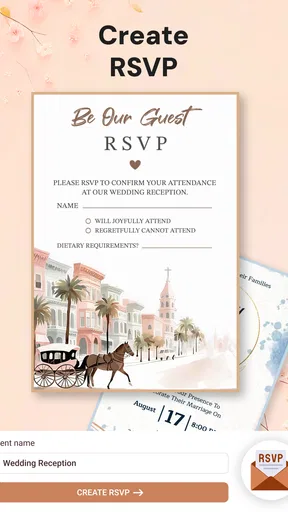
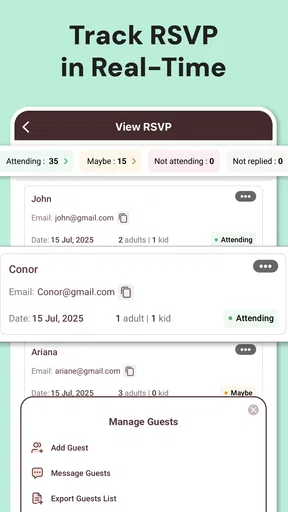
One of my favorite features has to be the seamless RSVP integration. Gone are the days of chasing people down for responses. Guests can RSVP directly through the invitation, and you’ll get real-time updates. It’s like magic! Plus, the app syncs effortlessly with your calendar, so you’ll never lose track of dates or guest lists.
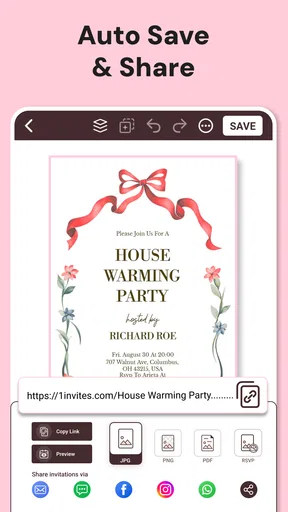
Another nifty feature is the ability to send invites via multiple platforms. Whether your friends are on email, WhatsApp, or even SMS, you can reach them without a hitch. And for the environmentally conscious among us, it’s a win-win—no more paper waste!
Setup checks before sending
Even a straightforward invitation workflow benefits from a final check. I would read the finished invite as if I were a guest seeing it for the first time: can I tell what the event is, when and where it happens, and how to respond? If the design makes the practical details compete with decorative text, I would simplify the layout or choose a less busy template. The goal is not to use every customization option; it is to make the information effortless to find.
For a group with mixed habits, choose the sending method that is most likely to reach everyone and keep the wording consistent wherever the invite is shared. Before distributing it widely, send it to one person you trust or inspect the final version yourself on the device you plan to use. This is a useful way to catch a typo or a detail that looks cramped after the design is finished. It also gives you a moment to make sure the RSVP instruction is plain enough that guests will know what to do.
People often wonder whether they can make a usable invitation without paying. In my experience, the free offering can be enough for a straightforward event, while in-app purchases provide a paid route for people who want additional options. The app is free to download, with in-app purchases ranging from $3.99 to $249.99 per item, so I would check the price shown for a particular purchase before confirming it. You do not need to treat every premium-looking option as essential: a clear design and accurate event details matter more than extra decoration.
Getting Started with Ease
Downloading Invitation Maker & Event RSVP is a breeze. It’s available on both Android and iOS, so no one’s left out. Once installed, you’re greeted with a quick tutorial that guides you through the basics. I found the instructions clear and to the point, which is excellent when you're eager to get started. The app doesn't require any sign-up process to begin, although creating an account can unlock additional features and template options.
A practical workflow for a busy week
Imagine I am organizing a family dinner after work and need to invite relatives who use different messaging habits. I would first settle the time and location, then make a simple invitation with the most important information easy to scan. I would share it through the channel each person is likely to see, rather than assuming one method suits everyone. As replies arrive, I would use the RSVP view to keep track of responses and separately note any answers that come by call or in conversation. That combination makes the app useful without pretending that every guest will follow one digital process.
For a larger gathering, I would also avoid treating an RSVP count as a complete headcount until I have considered household replies, plus-ones, and guests who have not answered. A short follow-up to only the people still undecided is less intrusive than repeatedly contacting the whole group. The app can help organize the invitation and responses, but the host still needs to define what counts as a complete reply and decide when to check in.
The Experience
Using the app feels like a creative adventure. I tested it out for an upcoming family reunion, and it was a hit! The invites looked professional, and the feedback from family was overwhelmingly positive. They particularly loved how easy it was to RSVP, which made organizing the event a whole lot smoother.
While the app does offer in-app purchases, the free version is surprisingly robust. You’ll have access to a decent selection of templates and features without spending a dime. However, if you find yourself needing more customization options or premium templates, a small fee might be worth it. I mean, who doesn’t love a little extra flair?
Recovering when the workflow stalls
If a template takes a while to appear, I would first give it a moment rather than tapping repeatedly and changing several things at once. The original experience can feel slower when Wi-Fi is unreliable, so checking the connection and trying again is a sensible first step. If a design is not behaving as expected, I would make one change at a time and review the result before continuing. That keeps it easier to tell whether the issue is loading, the chosen design, or an edit I just made.
If a guest says they cannot respond, I would confirm that they are looking at the actual invitation and that the RSVP instruction is visible, then offer a direct reply by message or call as a fallback. That avoids turning a minor access snag into a planning problem. I would also keep the event details somewhere I can refer to while editing, so I do not have to reconstruct them if I need to reopen the invitation or make a correction.
When a different tool makes more sense
This app is best suited to someone who wants an invitation that looks more considered than a plain text message, but does not want to build a design from a blank canvas every time. It can work well for family celebrations, informal parties, and other events where a visual invite and a simple response process are enough. The fact that it is listed for Everyone makes it broadly accessible, although adults organizing an event should still consider whether the design and communication method suit their guests.
I would choose a general graphic-design app instead if I needed exact control over every layout detail, a distinctive brand style, or artwork that must follow strict printing specifications. I would choose a dedicated event-management service if the gathering involved complicated ticketing, assigned seats, payments, or detailed guest logistics. Invitation Maker is appealing when the invitation itself is the main job; it should not be mistaken for a complete system for every kind of event operation.
Compared with making an invite in a document or sending a plain group message, the app offers a more visually focused starting point and an RSVP-oriented approach. A document editor may be more flexible for unusual formatting, while a simple message can be faster for a tiny group that already knows the plan. The trade-off is straightforward: use the app when presentation and collecting responses matter, and skip the extra design step when a quick note is all your guests need.
A Few Considerations
Of course, no app is without its quirks. I did notice that some templates were a bit slow to load, especially when my Wi-Fi was acting up. It’s something to keep in mind if you’re in a hurry. Also, while the app is generally intuitive, first-time users might need a bit of time to get the hang of the more advanced features.
Lastly, while the app does an excellent job of covering most events, there are occasional limits in template themes for very niche gatherings. But honestly, with a bit of creativity, you can adapt existing templates to fit your needs.
Who should use it, and who should skip it
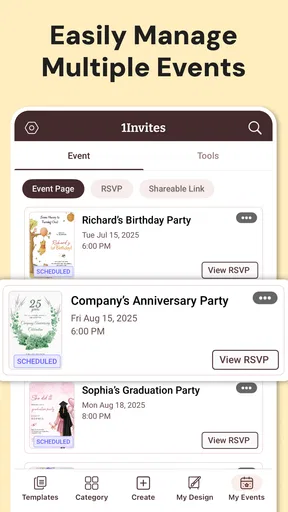
The strongest fit is a host who wants to make a good-looking invite without spending an evening learning a complex design tool. A birthday, reunion, dinner, or casual celebration is the kind of task where a ready-made visual structure can save effort. It is also useful when guests are comfortable responding digitally and the organizer wants a central place to keep an eye on replies.
I would skip it for a highly formal event if the available design choices do not match the required look, or when the invitation must meet detailed print-production rules. I would also avoid relying on an RSVP feature as the sole record for a group whose members tend to answer in scattered conversations. In those cases, another tool or a separate guest list may be more dependable. That is not a failing unique to this app; it is a reminder to match the workflow to the people being invited.
What to expect from the app over time
The app has been available since February 10, 2018, and its current version is 142.0. It requires Android 8.0 or later on Android, which is worth checking before trying to install it on an older device. It has a 4.9 average from around 119 thousand ratings, with over a million installs. Those figures suggest that many people have tried it, but I would still judge it by whether its templates suit your event and whether your guests will use its response flow. It is free to download and rated Everyone.
Because invitation design is often an occasional task, I would not pay for an upgrade until I had a specific need for an option that is not available in the free selection. For a one-off gathering, a basic template may do the job; someone who creates invitations often may value having more choices. The practical test is whether a paid item saves time or gives you a result you genuinely prefer, not whether it simply looks like the more elaborate choice.
Final Thoughts
All in all, Invitation Maker & Event RSVP is a solid choice for anyone looking to step up their invitation game. It combines creativity with practicality, making event planning less of a chore and more of an enjoyable experience. Whether you’re planning a small gathering or a grand celebration, this app has got you covered. So go ahead, give it a try, and let your creative juices flow. You might just wonder how you ever managed without it!
Privacy and Permissions
See what permissions an app requests and how it handles your data.
- Calendar
- read calendar events plus confidential information
- Contacts
- read your contacts
- Location
- approximate location (network-based), precise location (GPS and network-based)
- Phone
- read phone status and identity
- Photos/Media/Files
- read the contents of your USB storage, modify or delete the contents of your USB storage
- Storage
- read the contents of your USB storage, modify or delete the contents of your USB storage
- Camera
- take pictures and videos
- Wi-Fi connection information
- view Wi-Fi connections
- Device ID & call information
- read phone status and identity
- Other
- view network connections, full network access, run at startup, draw over other apps, control vibration, prevent device from sleeping
Verdict
Strengths of Invitation Maker: Cards + RSVP
- User-friendly interface, easy to navigate.
- Wide variety of templates available.
- Customizable fonts and colors.
- Integrated RSVP tracking feature.
- Supports photo and video invitations.
Limitations of Invitation Maker: Cards + RSVP
- Limited free design options available.
- Some features require in-app purchases.
- Occasional glitches with RSVP updates.
- No offline mode for editing.
- Ads can be intrusive in the free version.
Similar Picks in This Category
View All
Easy Quran Mp3 Audio Offline
Muslim Worldapp4.7

Invitation Maker: Cards & RSVP
Greetings Island4.9

StubHub - Live Event Tickets
StubHub4.3

Fever: Events & Tickets
Fever Labs4.7

Epic Freebie Games Radar
Arioch Pds - Apps & Games4.4

Invitation card Maker, Design
Splendid App Maker4.9
Frequently Asked Questions
What features does Invitation Maker & Event RSVP offer?
Invitation Maker & Event RSVP provides a range of features including customizable invitation templates, RSVP tracking, and event management tools. Users can personalize invitations with various themes, fonts, and images, and easily send them via email or social media. The app also offers real-time updates on guest responses.
Is Invitation Maker & Event RSVP user-friendly for beginners?
Yes, the app is designed with an intuitive interface that is easy to navigate, making it accessible for users with varying levels of experience. The step-by-step guide helps beginners create professional-looking invitations effortlessly, while the drag-and-drop functionality simplifies the design process.
Can I use Invitation Maker & Event RSVP offline?
While some features may require an internet connection, such as sending invitations or tracking RSVPs, many design tools and templates can be accessed offline. This allows users to work on their invitations without worrying about connectivity, although syncing with online features will require internet access.
What customization options are available in Invitation Maker & Event RSVP?
The app offers extensive customization options including a wide selection of templates, color palettes, and fonts. Users can also upload personal images and logos to make their invitations unique. Additionally, the app provides options to add personalized messages and adjust layout elements to suit individual preferences.
Is there a cost associated with using Invitation Maker & Event RSVP?
Invitation Maker & Event RSVP offers a free version with basic features, while premium features are available through in-app purchases or subscriptions. These may include access to exclusive templates, advanced RSVP tracking, and additional customization tools, providing users with flexibility based on their needs and budget.
